Test Driven Modelling
 If you come from a hard core development background one of the stranger concepts to experience is enterprise development (through modeling) with no unit test coverage strategy. I am not an advocate for smashing a unit test approach into a model driven development strategy but I do think that there are instances, when modeling more complex logic, where a test driven approach is both practical and needed. Additionally this approach works well when many modellers are working on common and re-used microflows where changes to a single microflow could effect a large portion of the application being developed.
To illustrate this point I have created a simple test module to house my test Microflows for some complex logic. The module contains a screen which outputs the testcase results.
There are 2 types of microflows being discussed below, the “test” microflows which handles the executable logic for the test itself. The “targeted” microflow which is the microflow containing business logic which is being tested.
The basics of creating a test driven approach can be summed up in 3 steps:
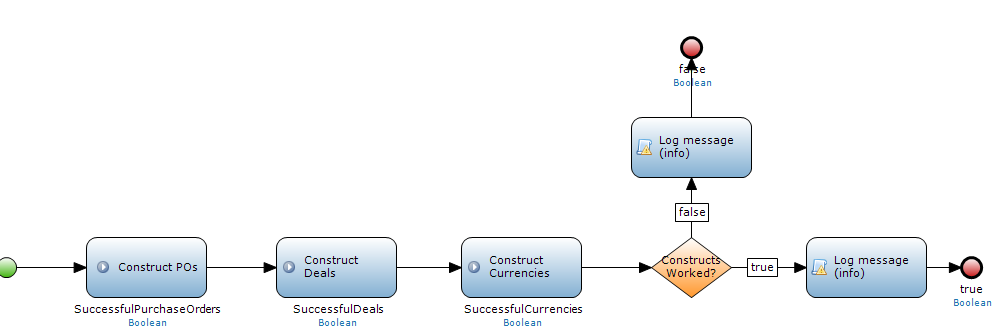
1. Create a Construct Microflow
This Microflow essentially removes all previous data out the database and populates the database with the entities needed to execute target microflows under certain conditions. Assert microflows will then ensure that the logic executed within the target microflow executes correctly given the controlled data set created in this step.
2. Test Microflow
A single test microflow called “test all” is created where other “assert” microflows are called from. Each “assert” microflow calls their respective targeted microflows. After calling the targeted microflow containing logic being tested the assert microflow then either retrieves the relevant entities that have changed from the microflow being tested or retrieves the returned object/variable the microflow being tested returns.
Given the controlled data created in step 1 the assert microflow then determines if the logic has executed correctly or not. The assert microflow then returns a true or false to the test microflow which then logs the result in a string variable called “result”.

3. Output to Screen
Lastly the result string is exported to the screen via the Microflow Label widget which executes our original “test all” microflow starting the testing process. Modellers can see the results on the screen using this method, instead of automation testing or navigating through the application, to execute complex logic in order to determine if all the logic scenarios are correctly covered.

In the example above I can see that my PO Changes and Order Place logic has failed and therefore needs attention. In a team environment I would expect modellers to execute these tests before merging code back into source in order to ensure that the source code is always accurate.

 Mendix and beyond